About Frame Weaver
Frame Weaver is a professional border-creation application for photographers and artists. It supports individual-image processing and batch processing through Autopilot, with reusable workflow presets, graphic watermarks, text inserts, color-management controls, and metadata preservation.
Supported Platforms
Section titled “Supported Platforms”- macOS
- Windows
- iOS
- Android
Supported Image Formats
Section titled “Supported Image Formats”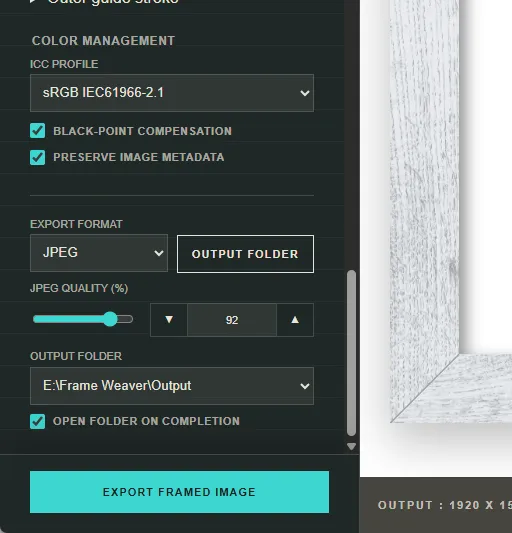
| Input | Output |
|---|---|
| JPEG (.jpg, .jpeg) | JPEG |
| PNG (.png) | PNG |
| TIFF (.tif, .tiff) | TIFF |
| BMP (.bmp) | BMP |
JPEG and BMP output is limited to 8-bit. PNG and TIFF preserve 16-bit image precision when supported by the source and workflow.
JPEG exports provide a JPEG Quality control from 1 through 100. The default is 92, which provides a strong visual-quality and file-size balance. The selection persists across restarts and is included in workflow presets.
Image Size Limits
Section titled “Image Size Limits”- Frame Weaver has no fixed limit on an image’s pixel count. Each edge of a source image may be up to 100,000 pixels, and an image with a longer edge is refused. Otherwise an image is limited only by the memory of the computer or device: when there is not enough to process it, Frame Weaver stops with the message “There is not enough memory to process this image. Please reduce the image size and try again.” and writes nothing.
- Large uncompressed or single-strip 16-bit TIFF files can need substantially more working memory than their dimensions alone suggest.
- These limits apply to manual exports, Autopilot, and External Editor Delivery. Autopilot checks supported source files during preflight and skips files that are corrupt, unreadable, or too large to process.
| Constraint | Maximum |
|---|---|
| Source image width | 100,000 px |
| Source image height | 100,000 px |
| JPEG output, each side | 65,535 px |
| PNG and TIFF output, each side | 100,000 px |
| Source and output pixel count | No fixed limit: the memory of the computer or device |