Frame Weaver Pro: Subscribing
A Frame Weaver Pro subscription adds the Galleries to Frame Weaver. You can subscribe yearly or monthly, and choose how much storage and transfer your plan has; see Your Plan: Storage and Transfer. On Mac and Windows you subscribe on the Frame Weaver page at fictionloom.com; on iPhone, iPad, and Android you can also subscribe in the app, through the App Store or Google Play. Regardless of where you buy your subscription, it is valid for up to three devices, including Mac, Windows, iOS and Android devices.
Adding Frame Weaver Pro to Your Frame Weaver License
Section titled “Adding Frame Weaver Pro to Your Frame Weaver License”If you already own Frame Weaver, you keep your license and add Frame Weaver Pro to it.
- Open About. The first button is Frame Weaver Pro Subscription. The license details also show a Frame Weaver Pro row with the same button.
- On Mac and Windows, the button opens the Frame Weaver page at its Frame Weaver Pro section. Subscribe with the email address of your Frame Weaver license, which the note beside the button shows, and Frame Weaver Pro is added to that license.
- On iPhone, iPad, and Android, the button opens the Frame Weaver Pro window: More info; Pay, Monthly or Annually; Storage and transfer, the size of your plan; its price in your store’s currency; Subscribe; Restore Subscription; and the store’s renewal terms. Choose how to pay and a size, then press Subscribe. When the purchase completes, the Galleries are added to your license and the window closes.
Subscribing Without a Frame Weaver License
Section titled “Subscribing Without a Frame Weaver License”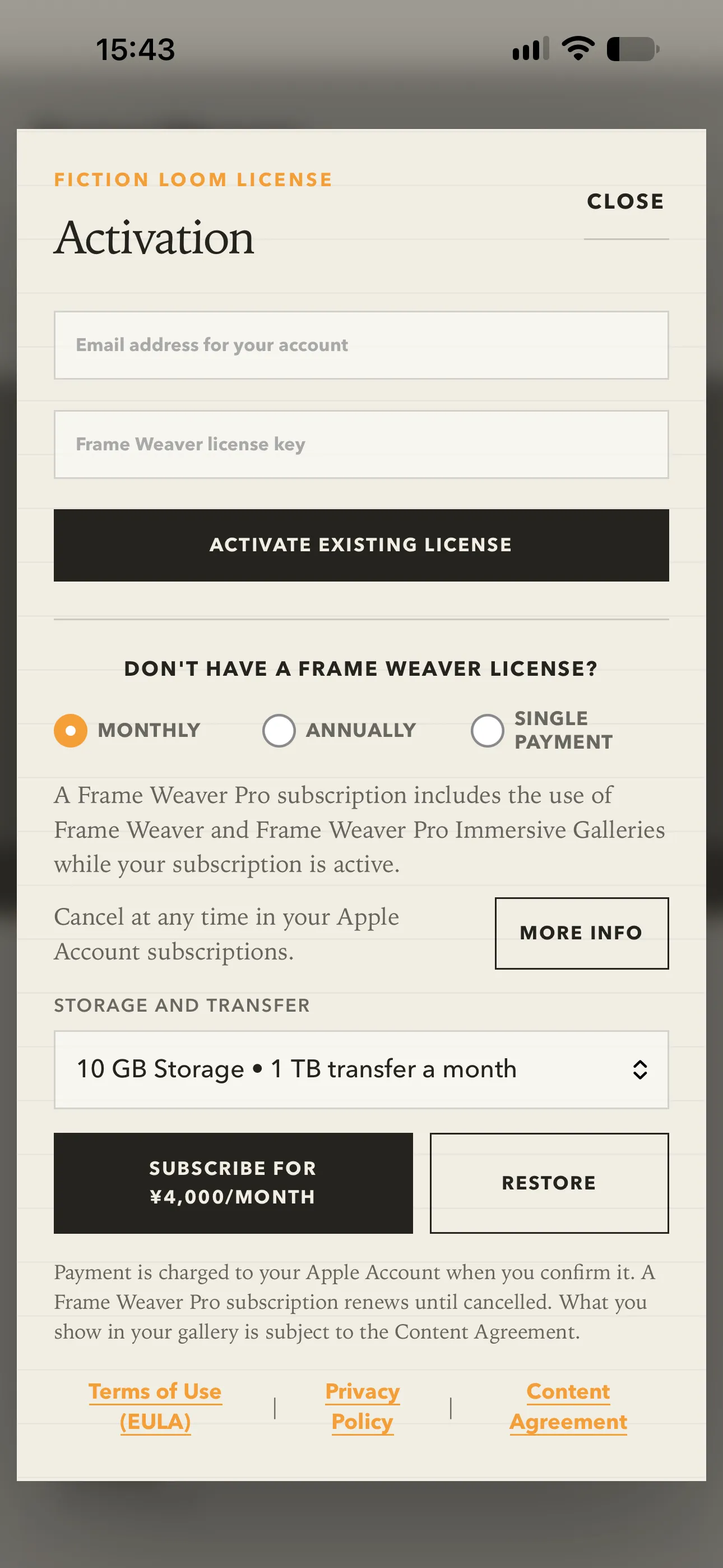
On iPhone, iPad, and Android, and on the Frame Weaver page at fictionloom.com, the choices are made in one place, under Don’t have a Frame Weaver license?:
- Enter your email address at the top of the license window. If you forget, pressing a purchase button asks for it beside that field.
- Choose Monthly, Annually, or Single Payment. Single Payment buys a perpetual Frame Weaver license without the Galleries; Monthly and Annually subscribe to Frame Weaver Pro.
- For a subscription, choose its size under Storage and transfer.
- Press the button with the price on it: Buy for and the price for a single payment, or Subscribe for and the price for each month or year. Restore, beside it, restores a purchase or subscription made before with the same store account.
What you are buying is described beneath the buttons, and for Frame Weaver Pro, More info says more about the Galleries. A Frame Weaver Pro subscription includes Frame Weaver for as long as it runs. On the website the price is shown in your own currency before you go to checkout.
The policy links beneath the plans are Terms of Use (EULA), Privacy Policy, and Content Agreement. What you show in your Galleries is subject to the Content Agreement; see The Content Agreement.
Your Plan: Storage and Transfer
Section titled “Your Plan: Storage and Transfer”Every Frame Weaver Pro plan includes storage, the space your pieces, logos, screens, and loading images take up, and transfer, what your Galleries send each month to the people who visit them, you included. Backup downloads count toward your transfer too.
Frame Weaver Pro comes with 10 GB of storage and 1 TB of transfer a month. Each step up adds 10 GB and 1 TB, to at most 50 GB and 5 TB. The prices are displayed in your local currency wherever you can buy these subscriptions.
| Plan | Storage | Transfer a month |
|---|---|---|
| Frame Weaver Pro | 10 GB | 1 TB |
| + 20GB Storage, 2TB transfer/month | 20 GB | 2 TB |
| + 30GB Storage, 3TB transfer/month | 30 GB | 3 TB |
| + 40GB Storage, 4TB transfer/month | 40 GB | 4 TB |
| + 50GB Storage, 5TB transfer/month | 50 GB | 5 TB |
You can change your plan at any time:
- Bought on the website: Change plan on My Licenses. Choose the size, press Review the change, and you are shown exactly what is charged now, or credited to your account, before anything changes. A larger plan is charged for the rest of the current billing period; a smaller one leaves a credit that comes off your next payments.
- Bought in the app: Change Plan in the license details, on the same kind of device you subscribed on. On an iPhone or iPad a larger plan starts at once, and you are charged the difference for the rest of the period; a smaller plan starts when your subscription renews. On Android the new plan starts at once and its price is charged then; what is left of the old plan is added to it as extra time.
Your new storage shows the next time you open your Gallery console. If the plan is not reflected, open Frame Weaver on any device, and tap the Console button at the bottom of the Source and Frame section.
Your License Details
Section titled “Your License Details”With Frame Weaver Pro active, the license details show:
- Includes, naming the Galleries and your plan’s storage and transfer.
- Subscription valid through, the date your current subscription period ends. This is separate from Offline through, which is how long this device may work without an internet connection.
- Manage Subscription, beneath the date, and, if you subscribed in the app on this kind of device, Change Plan.
Managing or Canceling Your Subscription
Section titled “Managing or Canceling Your Subscription”Manage Subscription takes you to wherever your subscription is managed:
- Bought on an iPhone or iPad: your Apple Account subscriptions.
- Bought on Android: your Google Play subscriptions.
- Bought on the website: My Licenses at fictionloom.com.
A subscription from one store is managed in that store, whichever device you press the button on. You can cancel at any time in your store’s subscription settings, and the subscription runs to the end of the period you have paid for. See When a Subscription Ends for what then happens to your Galleries.