Change History
What’s New in V1.7.6
Section titled “What’s New in V1.7.6”- Help and community from the About window. The About window now has User Manual, Quick Start Guide, Discord Discussion and Contact Support buttons. The two guides’ buttons replace the Online Manual icon in the icon rail, and both guides are now online at manuals.fictionloom.com.
What’s New in V1.7.5
Section titled “What’s New in V1.7.5”- Personal logo. You can now personalize MXD’s header with your own logo.
- Logging optimization. LOG MIDI now sits beside DIAGNOSTICS in Advanced Settings, so the large MIDI log is only kept when you need it.
What’s New in V1.7.4
Section titled “What’s New in V1.7.4”- Safer user oscillator switching. MXD now keeps each user oscillator’s parameter values within its own ranges when you switch between user oscillators, so a new oscillator can no longer inherit a value that silences the Minilogue XD.
- Import many programs at once. The Local Library’s Import button now takes several files in one go, so you can bring in a whole pack of programs, and each one goes into a free slot without replacing a program already in the library.
- Record from MIDI I/O controllers. In the standalone app, a Macro now records what you play on a controller ticked in the MIDI I/O section, just as it records the CONTROLLER input.
- QUANTIZE. The Macro notes editor has a QUANTIZE button that moves the selected notes, or all of them, onto the SNAP grid, perfect for tightening up finger-drummed patterns.
- SNAP 1/32. SNAP now offers 1/32 steps as well as 1/16, 1/8 and 1/4.
- Clearer grid lines. The notes editor shows plainer bar and beat lines, and lines at the SNAP step when there is room for them.
- A taller Macro panel. The Macro and Session Grid panel is a little taller, giving the editors more room.
What’s New in V1.7.3
Section titled “What’s New in V1.7.3”- Moved the Session Grid to its own header area with a 4 x 4 grid icon. You can also now double-click the program name to rename the program, then keep the new name with the Minilogue XD’s Write button.
- The Local Library header gained UPDATE PROGRAM, which replaces the selected library program with the Minilogue XD’s current program, keeping its slot, and ADD TO LIBRARY, which adds the Minilogue XD’s current program in the next free slot.
- The Multi Engine’s user oscillator dials now show each oscillator’s own parameter names and ranges, and gray out the parameters it does not have.
What’s New in V1.7.2
Section titled “What’s New in V1.7.2”V1.7.2 sets play options for a whole grid at once, lets MIDI I/O play the XD, and fixes audio pops in Live and reconnecting an unplugged audio interface.
What’s New in V1.7.1
Section titled “What’s New in V1.7.1”Minor bug fixes.
What’s New in V1.7.0
Section titled “What’s New in V1.7.0”Bounce Macros to Audio
Section titled “Bounce Macros to Audio”In the standalone app, BOUNCE records a Macro played on your Minilogue XD as audio, tail and all, and keeps it beside the Macro. Choose the part that plays over its waveform, then set any Session Grid slot to play its bounce instead of the XD: the slot shows the waveform, starts from its pad, plays in the chain, and mixes with everything else, leaving the XD free for a different program. Bounce from the lanes or straight from a grid slot, and EXPORT MIDI saves a Macro’s notes and lanes as a MIDI file. See Bouncing Macros to audio in the Macros chapter.
Locking the tempo
Section titled “Locking the tempo”Each Minilogue XD program has its own tempo, and in the standalone the Macro clock normally follows the program you’re on. Click the padlock at the dial’s top right to lock it: it closes and lights, and Macros and AUDIO slots keep their tempo when you change programs. The XD’s own sequencer, arpeggiator and synced effects still use the program’s tempo until you turn TEMPO, in MXD or on the XD, which then sets both. While a locked tempo differs from the program’s, the MACRO tab’s status line says so, for example TEMPO 96.0 BPM (Program Tempo 60.0 overridden). Click the padlock again to follow each program’s tempo once more.
Clearing Grids
Section titled “Clearing Grids”CLEAR and CLEAR SET empty a grid or a whole grid set, offering to save it first if it has changes, and the Session Grid is taller.
Click to Play and Hand-Over Pads
Section titled “Click to Play and Hand-Over Pads”In the Session Grid, CLICK TO PLAY lets a click play a slot just as its pad does, by its own Start Macro timing and alongside the slots already playing. A new Play Mode, Tap to start and stop when another Macro starts playing, hands over from one slot to the next at the next beat or bar, so you can switch between drum beats seamlessly.
The Wheels in Macros
Section titled “The Wheels in Macros”Macros now record and play your pitch wheel and MXD’s M and E wheels, from your controller keyboard or the sliders. M and E stay where you leave them.
And More
Section titled “And More”Keys played on your controller keyboard now reach the Minilogue XD once, where before they were sent twice, which could leave notes hanging, especially with two XDs in poly chain. A key still held when you stop a take now ends where you stopped, quick notes are no longer recorded as long ones, and a Macro played once no longer sounds its first note again at its end. TEMPO turned from a MIDI controller now reaches the XD.
Drag or type the TEMPO number to set an exact tempo. Bounces now record both Minilogue XDs in poly chain. When Windows reconnects a MIDI device, after sleep for example, MXD opens its ports again, and at startup MXD keeps your MIDI IN choice and reloads your program even when the XD’s ports open late. The Macro editors remember their SNAP setting, and the first hit of a new take now sounds on its first playback.
What’s New in V1.6.0
Section titled “What’s New in V1.6.0”Macros
Section titled “Macros”MXD 1.6.0 introduces Macros: record the moves you make on MXD, your controller or the Minilogue XD itself, along with the notes you play, aftertouch and your sustain pedal, then play them back in time with your DAW, the XD’s sequencer or MXD’s own clock. Overdub new moves, edit any lane or note afterwards, set the length and time signature, count yourself in with the metronome, and chain Macros together in the Session Grid. See the Macros chapter.
Playing Macros from Pads
Section titled “Playing Macros from Pads”Every Session Grid slot is now also a pad. Fire Macros from a drum pad controller or a keyboard split, at the start of a bar or anywhere in it, and layer them as you play: each pad’s Macro runs from its own beginning, not the song’s position. Grids are saved on their own or in grid sets of 3, 4 or 8, to match your controller’s banks, and each slot can loop, play while held, wait for the beat or the bar, answer to a CC and take a color. Macros can now be organized in folders, and the NOTES piano roll can select and move several notes at once. See Playing Macros from Pads in the Macros chapter.
Multi Engine Improvements
Section titled “Multi Engine Improvements”We moved the Multi Engine VPM Parameters 1 - 6 from the Advanced Settings section into the Multi Engine section, alongside the original Type and Shape dials. We also added these dials for the User Oscillators, and now identify the names of User Oscillators during startup, or by clicking REFRESH at the bottom of the menu.
Similarly, we now also display the names of User MOD FX in the SUB menu, updated on startup or via the menu REFRESH option at the bottom of the menu.
Additional Animated Dial Playback
Section titled “Additional Animated Dial Playback”Motion track playback now animates the dial movement for parameters that are modified during playback. This can be turned on and off with the Advanced Settings > Performance Control > Animate Motion Playback switch.
Built for Your Kontrol Keyboard
Section titled “Built for Your Kontrol Keyboard”Two new Kontrol S-Series templates put the Macro controls on page 1, and a new MAPPING menu in the MIDI I/O settings switches MXD’s default CCs to match. In the standalone, your keyboard’s transport buttons can now drive the Macro, lit to match, and one knob can flip between MXD’s header views.
And More
Section titled “And More”PANIC now clears every stuck note, MXD warns you when your Minilogue XD stops responding, missing Local Libraries can be relinked in place, and DIAGNOSTICS switches itself off after 24 hours.
What’s New in V1.3.1
Section titled “What’s New in V1.3.1”Updated UI
Section titled “Updated UI”We designed some Minilogue XD-like metal switches for use throughout the UI, and also spend time making the UI useful in portrait mode, as well as being able to make MXD more compact that ever before, to fit into any workflow.
Local Library and Set List modes
Section titled “Local Library and Set List modes”You can now run limitless programs on your Minilogue XD via our new Local Libraries and Set Lists. Import your Minilogues programs via a Korg .mnlgxdlib file exported using the KORG Sound Librarian or grab all of the programs from your Minilogue XD with the Hardware Import button, and run the entire library on one slot. You could run 250,000 and more programs on one device!
After creating at least one Local Library, you can also create Set Lists, for use during performance or as a tight favorites list of programs.
This is too big a feature to explain here, so please see the Local Libraries and Set Lists section.
What’s New in V1.2.0
Section titled “What’s New in V1.2.0”Sequencer and Motion Editor
Section titled “Sequencer and Motion Editor”Version 1.2 expands MXD from a synth parameter editor into a deeper program and performance workspace. The largest addition is the Minilogue XD sequencer editor: MXD can now read and edit the hardware sequencer, capture notes and chords step by step, edit velocity, rests, and ties, follow the hardware transport, send start/stop to the device, transpose a sequence, and save reusable sequencer presets in a local library in the location of your choice.
Up to 8 pinned sequencer presets can be loaded quickly from the sequencer header, making it practical to move useful patterns between programs without first saving them to the Minilogue XD.
Version 1.2 also adds a Motion Editor for the sequencer. When the selected program has Motion information, we highlight the Motion Mode button to indicate the presence of Motion data. Of course, you can click the Motion Mode button any time to add your own motion from scratch.

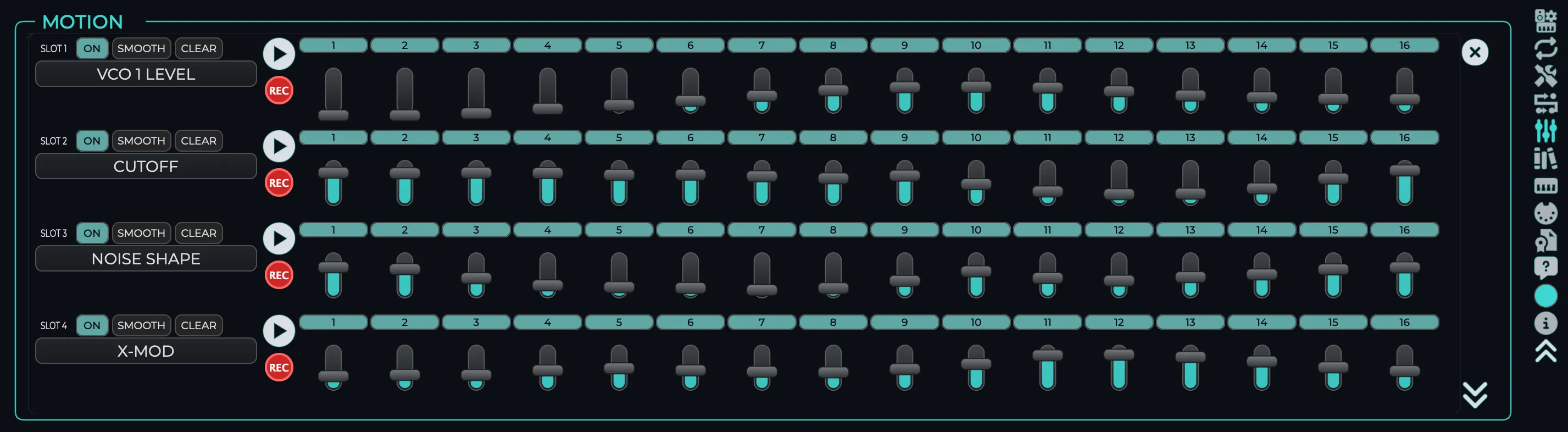
Clicking the Motion Mode button displays the XD’s four motion slots, lets you choose supported motion parameters, edit per-step values, enable smoothing, clear slots, and record parameter movement while the sequencer runs. The MIDI Learn and Native Instruments KONTROL S-Series template workflow has been extended to cover sequencer, transport, and Motion controls, including scaled control behavior for continuous sequencer and Motion targets.
Tabbed Header and Icon Rail
Section titled “Tabbed Header and Icon Rail”The interface has also been reorganized around a lower-profile header with tabbed header areas and improved help overlays, leaving more room for the main synth controls while keeping licensing, MIDI Learn, Advanced, Quick Help, and sequencer tools close at hand. This is now all accessible from the icon rail in the top-right corner of the interface, and some headers are automatically displayed when the KONTROL S-Series Mk3 MXD template button is pressed.