MIDI Setup
MIDI IN
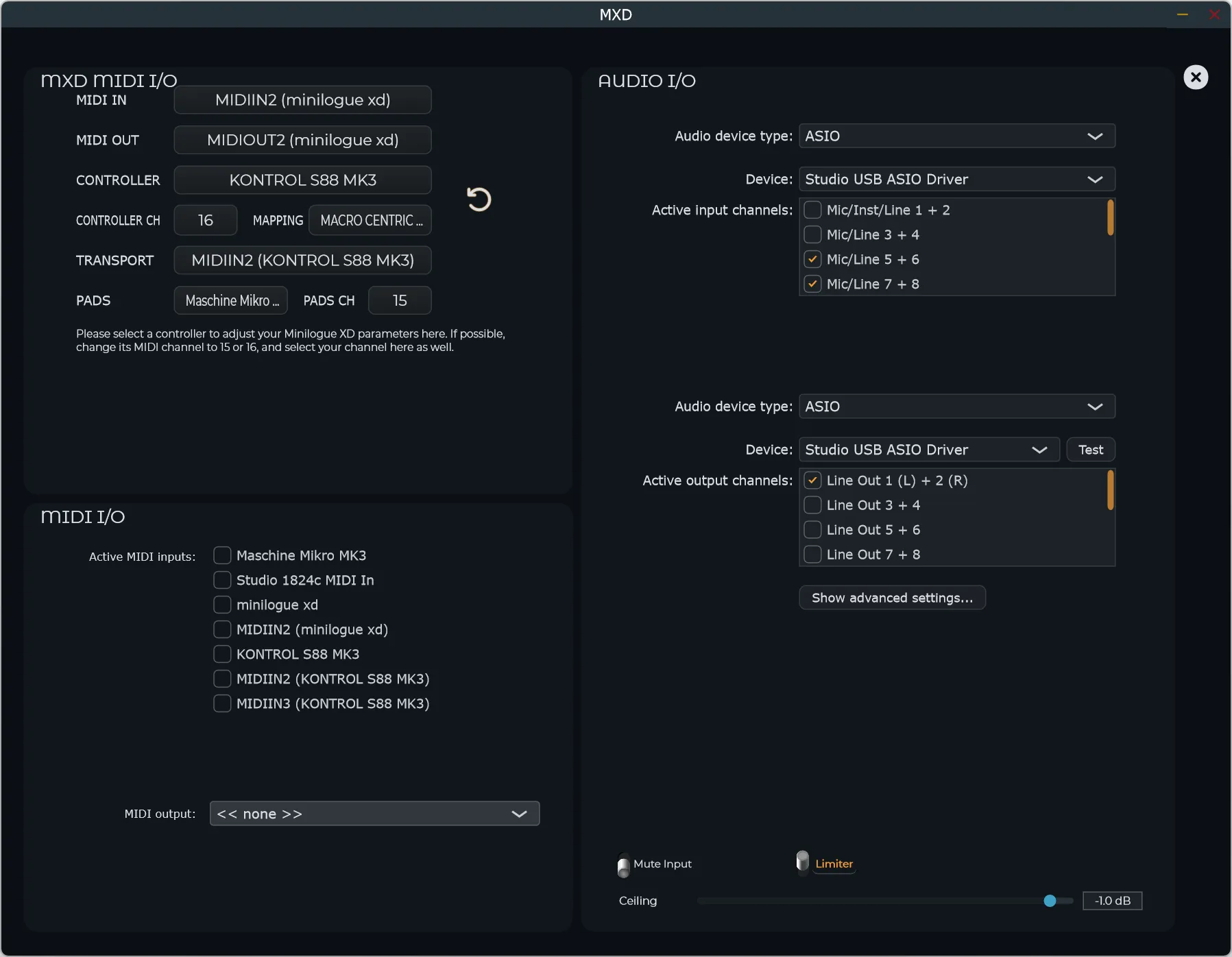
Section titled “MIDI IN”MIDI IN is the incoming port MXD listens to for data from the Minilogue XD.
MIDI OUT
Section titled “MIDI OUT”MIDI OUT is the outgoing port MXD uses to send changes back to the Minilogue XD.
External Controller Input
Section titled “External Controller Input”MXD can also listen to a separate external controller input. This is useful if you want to perform or automate from a controller while still communicating with the Minilogue XD hardware.
When using an external controller, to ensure you can record and play back automation correctly, change your controller’s channel to 16, or any channel other than your Minilogue XD, and select the channel number under CONTROLLER CH. You may also select All and leave it to MXD to detect.
When recording automation, your DAW may capture generic MIDI CC lanes simultaneously. Those lanes can be kept, ignored, or deleted depending on the workflow.
Important: use MXD’s own MIDI IN and MIDI OUT selectors for the Minilogue XD hardware connection.
When using the VST3 or AU plugin version of MXD, the Audio I/O is managed by the DAW.
Mapping (Kontrol Templates)
Section titled “Mapping (Kontrol Templates)”Beside CONTROLLER CH is the MAPPING menu. It sets which CCs MXD listens for by default, to match the Kontrol template you load:
Standard MIDI Mapping: use with MXD.kmt (standalone) or MXD DAW.kmt (DAW). Macro Centric Mapping: use with MXD Macro.kmt or MXD Macro DAW.kmt. A few rarely used switches give up their default CCs so the Macro controls can have them; those switches remain learnable.
Only the two entries for the version you’re running can be selected, and MXD remembers your choice separately for the standalone and the plug-in. Anything you’ve mapped yourself with MIDI Learn is kept, whichever mapping you choose.
Transport (Standalone)
Section titled “Transport (Standalone)”The TRANSPORT row lets your keyboard’s transport buttons drive the Macro. Set it to your keyboard’s DAW-control port (on a Kontrol S-Series MK3 this is MIDIIN2), and Play, Stop, Record and Loop control the Macro, lit to match. See Your keyboard’s transport buttons in the Macros chapter for details.
The PADS row lets a drum pad controller, or a split on your keyboard, play the Session Grid’s slots.
- PADS is a pad controller’s own port. MXD reads it only for the pads; nothing from it reaches the Minilogue XD.
- PADS CH is the MIDI channel the pads listen on, or OFF. Pads come from the PADS port, from the CONTROLLER port (a keyboard split), and in a DAW from the track’s MIDI. Everything on this channel plays the pads and goes no further.
For a keyboard split, leave PADS on NONE: MXD already reads the CONTROLLER port, and won’t open it a second time as PADS. While a Kontrol S-Series keyboard is the CONTROLLER, PADS CH grays out the template’s channel, and CONTROLLER CH grays out PADS CH. See Playing Macros from Pads in the Macros chapter.
Sustain Pedal
Section titled “Sustain Pedal”In the standalone, MXD passes your controller keyboard’s sustain pedal (CC 64) on to the Minilogue XD, along with its notes, pitch bend, mod wheel and aftertouch.